2:16
How to Calculate Net Present Value (Npv) in Excel
Excel, Word and PowerPoint Tutorials from Howtech
Overview
This video explains how to calculate Net Present Value (NPV) using Excel's built-in NPV function. It defines NPV as the present value of future cash flows minus the initial investment cost. The tutorial emphasizes that cash flows must occur at regular intervals for accurate calculation. It demonstrates how to use the NPV function with a discount rate and a range of cash flows, including the initial investment, to compare different investment options and determine the more profitable one.
How was this?
Save this permanently with flashcards, quizzes, and AI chat
Chapters
- NPV represents the present value of an investment's future cash flows minus its initial cost.
- It's a financial metric used to evaluate the profitability of an investment.
- Accurate NPV calculation requires that all cash flows occur at consistent, regular intervals.
Understanding NPV helps you make informed decisions about which investments are likely to be more profitable by considering the time value of money.
- Excel has a dedicated NPV function to simplify calculations.
- The NPV function requires two main arguments: the discount rate and the range of future cash flows.
- The discount rate represents the return from a guaranteed investment, like a US Treasury bill, and reflects the time value of money.
Knowing how to use Excel's NPV function allows for quick and accurate financial analysis, saving time and reducing manual calculation errors.
The discount rate is explained as the income from a guaranteed investment like a US Treasury bill.
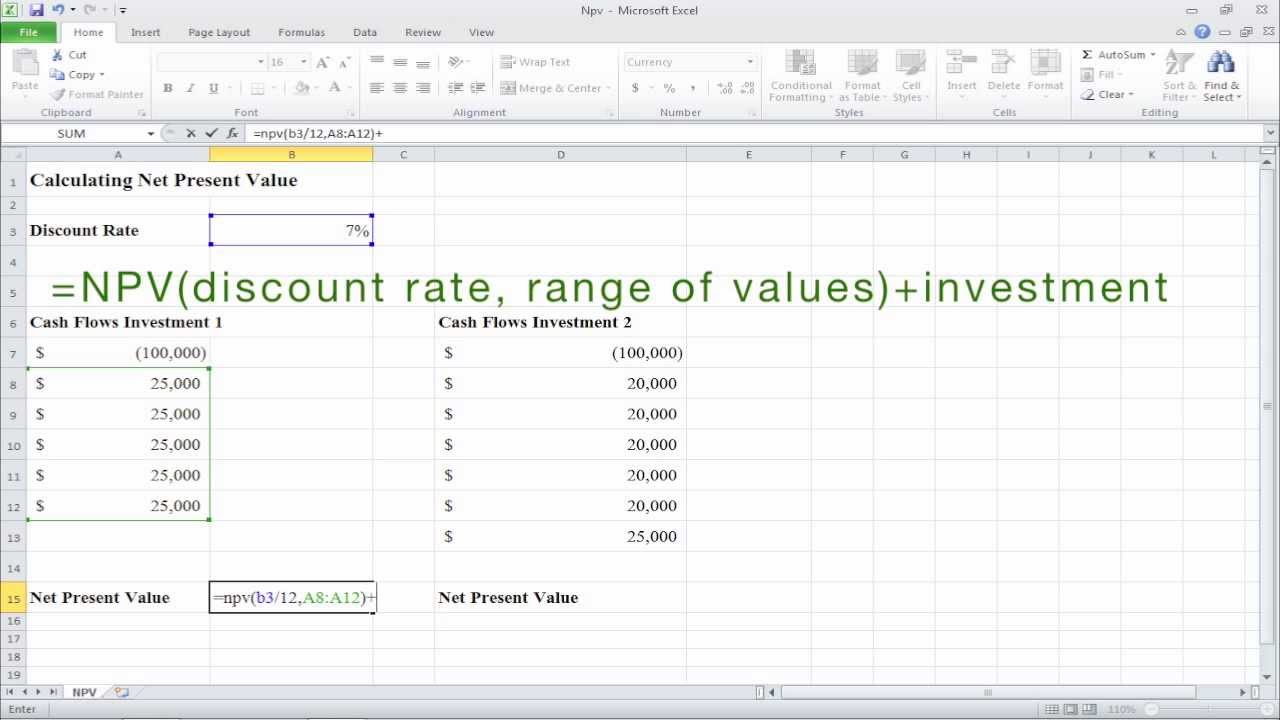
- To calculate NPV in Excel, use the formula: `=NPV(rate/period, range_of_cash_flows) + initial_investment`.
- If cash flows are monthly, divide the annual discount rate by 12.
- The initial investment is added separately because the Excel NPV function only accounts for future cash flows, not the initial outlay.
This practical application shows how to directly translate financial concepts into actionable Excel formulas for real-world investment comparisons.
An example is shown where an initial investment of $100,000 is compared with projected cash flows of $25,000 or $20,000 over several periods, using a discount rate divided by 12.
Key takeaways
- Net Present Value (NPV) is a crucial tool for evaluating investment profitability by accounting for the time value of money.
- Excel's NPV function simplifies the calculation, but it's essential to understand its arguments and limitations.
- Consistent timing of cash flows is a prerequisite for accurate NPV calculations.
- The discount rate reflects the opportunity cost of capital or the return on an alternative investment.
- Remember to add the initial investment cost separately to the result of Excel's NPV function.
- Comparing NPVs of different investment options helps in selecting the most financially beneficial one.
Key terms
Net Present Value (NPV)Present ValueCash FlowDiscount RateInitial InvestmentTime Value of MoneyExcel NPV Function
Test your understanding
- What does Net Present Value (NPV) fundamentally represent for an investment?
- Why is it important that cash flows occur at regular intervals when calculating NPV?
- How does the discount rate factor into the NPV calculation, and what does it signify?
- What is the correct way to incorporate the initial investment cost when using Excel's NPV function?
- How can calculating the NPV for multiple investment options aid in decision-making?