Touchstone Onboarding
Sennel
Overview
This video provides a comprehensive onboarding guide for Project Touchstone, focusing on essential administrative and task-related procedures. It details how to track time using the Handshake platform, navigate the Learning Hub for project information, and understand the pod structure based on expertise. The guide also explains communication protocols via Slack, the roles within pods (Pod Lead, Pod Specialist), and the workflow for creating and executing tasks using Feather and Vagon. Key emphasis is placed on understanding task creation, rubric development, and the final review process to ensure quality deliverables, while also outlining important rules regarding AI usage and confidentiality.
Save this permanently with flashcards, quizzes, and AI chat
Chapters
- Onboarding covers time tracking, the Learning Hub, pod structure, and task roles.
- Payment is provided for the onboarding session, reviewing the Learning Hub, and attending a workshop after completing 85-90% of the first M1 task.
- Time tracking is initiated through the Handshake platform by selecting 'Unclaimed Onboarding/Workshop' tasks and clicking 'Go to Feather' to start the timer.
- The Handshake timer must be running before proceeding with other onboarding steps.
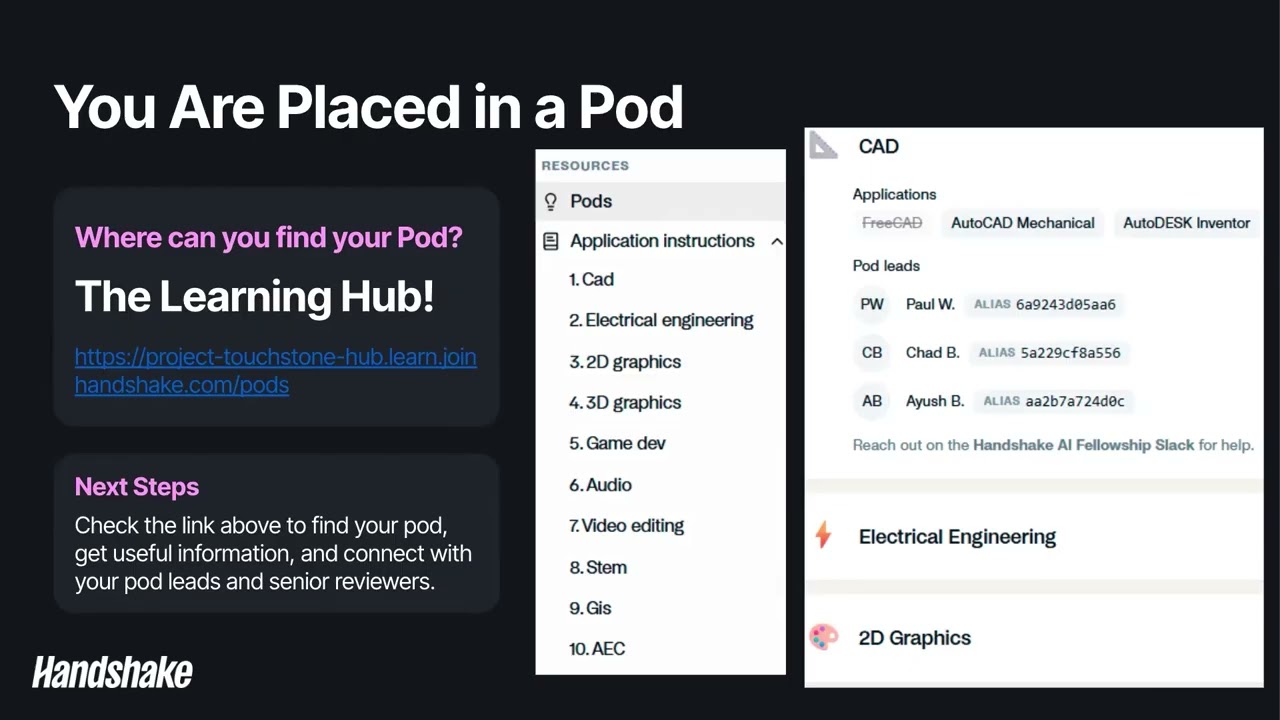
- The Learning Hub serves as the central repository for all project information and is crucial for understanding roles and resources.
- The project is organized into 'pods' based on specific software or expertise (e.g., CAD, Electrical Engineering, Video Editing).
- Within pods, individuals have roles like Pod Lead and Pod Specialist, who provide assistance but are not direct supervisors.
- Understanding the pod structure helps in collaborating with peers who have similar expertise.
- Slack is the primary communication tool, with usernames formatted as 'First Name Last Initial'.
- To find users, use their alias, which is the beginning of their email address (alphanumeric@handshakecommunity.ai).
- Key Slack channels include 'Touchstone Announcements' for project updates, 'Touchstone Social' for networking, 'Touchstone Tasking' for general questions, 'Touchstone New Taskers' for daily updates, and a dedicated 'Pod Specific Channel' for your cohort.
- Your first and last stop each day should be Slack to check for important announcements and issues.
- The task workflow involves roles like Manager One (task creator), Manager Two (reviewer), and Employee (task executor).
- Manager One creates tasks in Feather, defining prompts, rubrics, and providing CC0-licensed reference and starting state files.
- Manager Two reviews tasks for completeness, alignment, and rubric measurability, either approving or sending back for revisions.
- Employees claim tasks, work within Vagon (with screen recording and keylog capture), and submit deliverables back through Feather.
- The process emphasizes collaboration, with feedback aimed at improving tasks and skills.
- Manager One tasks must be self-contained, providing all necessary information and CC0-licensed assets.
- Prompts should be written with a managerial tone, explaining purpose and expectations without micromanaging steps.
- Rubrics are critical for objective evaluation, using binary criteria (yes/no, true/false) with a scale of importance (1-20) for each item.
- Rubric items should be comprehensive, objective, non-contradictory, and focused on the final output, not the process.
- Tasks must be measurable and reproducible, ensuring clear evaluation criteria.
- Key platforms include Handshake (time tracking), Feather (task creation/management), and Vagon (task execution recording).
- Access invitations for these platforms should arrive within 1-2 business days; if not, contact Fellow Support.
- Use Handshake Slack channels or email Fellow Support (fellow-support@joinhandshake.com) for most issues, especially regarding tasking or platform access.
- Client Slack channels are for client-specific communication, not project support.
- Strict rules prohibit LLM/AI use in task creation or deliverable generation, and all project information is confidential.
- The final step of onboarding is attending a tasking workshop after completing 85-90% of your first M1 task.
- Workshops are scheduled Monday-Friday at various times and may occur on alternating weekends.
- Pods may not be represented on all days, so check the schedule for your specific pod's availability.
- If unable to attend a scheduled workshop, contact a Pod Lead to arrange an alternative time.
- Only one Handshake timer should be active at a time, submitted only upon completion of work in Feather/Vagon.
Key takeaways
- Accurate time tracking via Handshake is mandatory for compensation and project management.
- The Learning Hub is your primary resource for understanding project structure, roles, and procedures.
- Effective communication and collaboration rely heavily on understanding and utilizing the various Slack channels.
- Task creation requires meticulous attention to detail in prompts, rubrics, and asset provision, adhering to CC0 licensing.
- The workflow involves distinct roles (Manager One, Manager Two, Employee) that collaborate to produce high-quality deliverables.
- Rubrics must be objective, measurable, and focused on the final output to ensure consistent evaluation.
- Strict adherence to rules regarding AI usage and confidentiality is critical for project participation.
- Tasking workshops are a mandatory part of onboarding, providing essential feedback on your first M1 task.
Key terms
Test your understanding
- How do you initiate time tracking for onboarding activities on the Handshake platform?
- What is the purpose of the 'pods' within Project Touchstone, and how are they organized?
- Describe the primary function of each key Slack channel mentioned (Announcements, Social, Tasking, New Taskers, Pod Specific).
- What are the key responsibilities of a 'Manager One' when creating a task in Feather?
- How should rubrics be constructed to ensure objective and measurable task evaluation?
- What is the process for obtaining access to project platforms like Feather and Vagon, and who should be contacted for issues?
- Why is attending a tasking workshop considered the final step in the onboarding process?