20:11
شرح ال OSI Model وال 7 مراحل شرح مبسط بالعربي في 20 دقيقة فقط
IT Dose
Overview
This video explains the OSI model, a conceptual framework for network communication, detailing its seven layers and their functions. It breaks down how data is processed and transmitted from an application on one device to another, emphasizing the role of each layer in tasks like data formatting, segmentation, routing, and error checking. The explanation uses analogies and examples to illustrate concepts like protocols, IP addresses, MAC addresses, and the differences between TCP and UDP, aiming to provide a foundational understanding of network communication principles.
How was this?
Save this permanently with flashcards, quizzes, and AI chat
Chapters
- The OSI model is a standard developed by ISO to ensure interoperability between different network devices.
- It divides network communication into seven distinct layers, each with specific functions.
- Data travels down these layers on the sending device and up the layers on the receiving device, in reverse order.
- Understanding the OSI model is crucial as it forms the basis for most networking concepts.
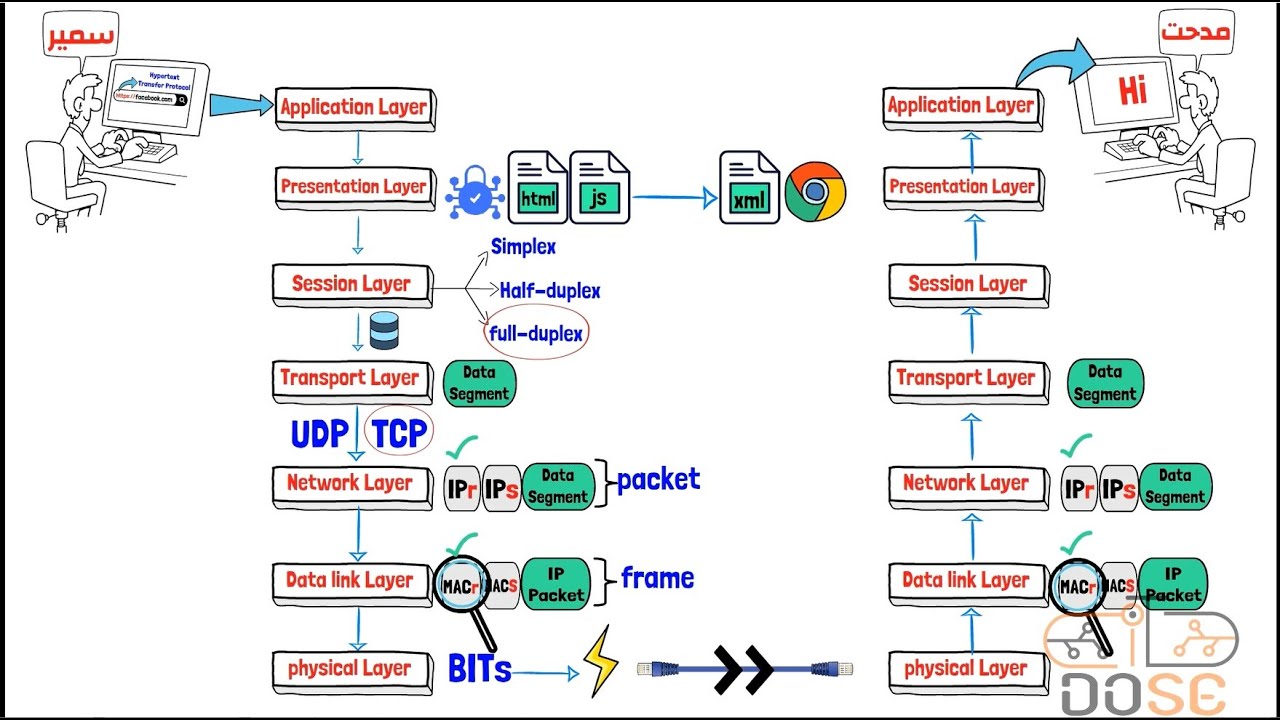
This chapter introduces the fundamental structure of network communication, explaining why a standardized model is necessary for devices to interact effectively.
When you type 'google.com' into your browser, it uses the HTTP protocol, which is handled at the application layer.
- The Application Layer (Layer 7) provides network services directly to end-user applications and defines protocols (e.g., HTTP, FTP, SMTP).
- The Presentation Layer (Layer 6) handles data translation, encryption/decryption (like SSL), and compression to ensure data is in a usable format.
- The Session Layer (Layer 5) manages communication sessions, establishing, maintaining, and terminating connections, and handles authentication and authorization.
- These layers are often referred to as the 'software layers' because they deal with user-facing applications and data presentation.
These layers are the first point of contact for users and applications, ensuring data is correctly formatted, secured, and that communication sessions are managed efficiently.
When you upload a video to Facebook, the Presentation Layer compresses it to reduce file size, and the Session Layer might manage the connection to ensure it uploads completely.
- The Transport Layer (Layer 4) is responsible for end-to-end data transfer, segmenting data from the session layer into smaller pieces.
- It manages flow control to prevent overwhelming the receiver and ensures data arrives in the correct order.
- TCP (Transmission Control Protocol) is a reliable, connection-oriented protocol that guarantees delivery and order.
- UDP (User Datagram Protocol) is an unreliable, connectionless protocol that prioritizes speed over guaranteed delivery.
This layer is critical for ensuring data is transferred reliably or quickly, depending on the application's needs, by choosing between TCP and UDP.
Video conferencing or online gaming uses UDP for speed, while sending an important work email uses TCP for reliability.
- The Network Layer (Layer 3) handles logical addressing (IP addresses) and routing, determining the best path for data packets across networks.
- It receives segments from the Transport Layer, adds an IP header to create packets, and uses routing protocols to find the most efficient route.
- IP addresses are unique logical identifiers assigned to devices on a network.
- Routers operate at this layer to forward packets between different networks.
This layer enables data to travel across complex, interconnected networks by providing logical addressing and intelligent path selection.
When you send a packet from your computer to a server on the internet, the Network Layer uses IP addresses to route it through various routers to its destination.
- The Data Link Layer (Layer 2) handles physical addressing (MAC addresses) and ensures reliable data transfer across a single physical link.
- It takes packets from the Network Layer, adds a MAC address header and trailer to create frames, and performs error detection.
- MAC addresses are unique physical hardware identifiers assigned to network interface cards (NICs).
- Error detection techniques like parity checks, checksums, and CRC (Cyclic Redundancy Check) are used to identify corrupted frames.
This layer ensures that data is correctly transmitted and received within a local network segment and detects errors that may occur during transmission.
When your computer sends data to your Wi-Fi router, the Data Link Layer adds the MAC address of the router to the frame so the router knows to accept it.
- The Physical Layer (Layer 1) is responsible for the actual transmission of raw bits over the physical medium.
- It defines the physical and electrical specifications for devices, including voltage levels, pinouts, and cable types.
- Data is converted into electrical signals, light pulses, or radio waves depending on the transmission medium (copper, fiber optic, wireless).
- This layer ensures that bits can be sent and received across the network medium.
This is the foundation of network communication, translating digital data into signals that can travel across physical wires or through the air.
When data travels through an Ethernet cable, the Physical Layer converts the bits into electrical signals that represent those bits.
- The video walks through an example of sending a Facebook message to illustrate the end-to-end data flow across all seven layers.
- Data moves down the layers on the sender's device, with each layer adding its own header information.
- On the receiver's device, data moves up the layers, with each layer stripping off its corresponding header and processing the data.
- This entire process, from application to physical transmission and back, happens in milliseconds.
This integrated example helps solidify understanding by showing how the functions of each layer work together in a real-world scenario.
Sending a Facebook message involves HTTP at the application layer, encryption at the presentation layer, TCP at the transport layer for reliable delivery, IP routing at the network layer, MAC addressing at the data link layer, and signal transmission at the physical layer.
Key takeaways
- The OSI model provides a standardized, layered approach to understanding network communication.
- Each layer of the OSI model performs specific functions, building upon the services of the layer below it.
- Protocols are sets of rules that govern communication at each layer, enabling devices to interact.
- Reliable data transfer (TCP) is crucial for applications where accuracy is paramount, while fast transfer (UDP) is better for real-time applications.
- IP addresses are used for logical routing across networks, while MAC addresses are used for local network delivery.
- Error detection and correction mechanisms at the Data Link Layer ensure data integrity during transmission.
- The Physical Layer is responsible for the actual transmission of bits as signals over the network medium.
Key terms
OSI ModelLayerProtocolHTTPFTPSMTPSSLSessionTransport LayerTCPUDPPacketNetwork LayerIP AddressRouterData Link LayerMAC AddressFramePhysical LayerBitSignalCRC
Test your understanding
- What is the primary purpose of the Presentation Layer in the OSI model?
- Why is the Transport Layer important for differentiating between applications like video streaming and email?
- How does the Network Layer use IP addresses to facilitate communication between different networks?
- What is the difference between a MAC address and an IP address, and at which layers are they used?
- Explain the trade-offs between using TCP and UDP for data transmission.