32:27
Comprehensive Project description with step by step tutorial
CCNA, CCENT Video Channel - Flipped Classroom
Overview
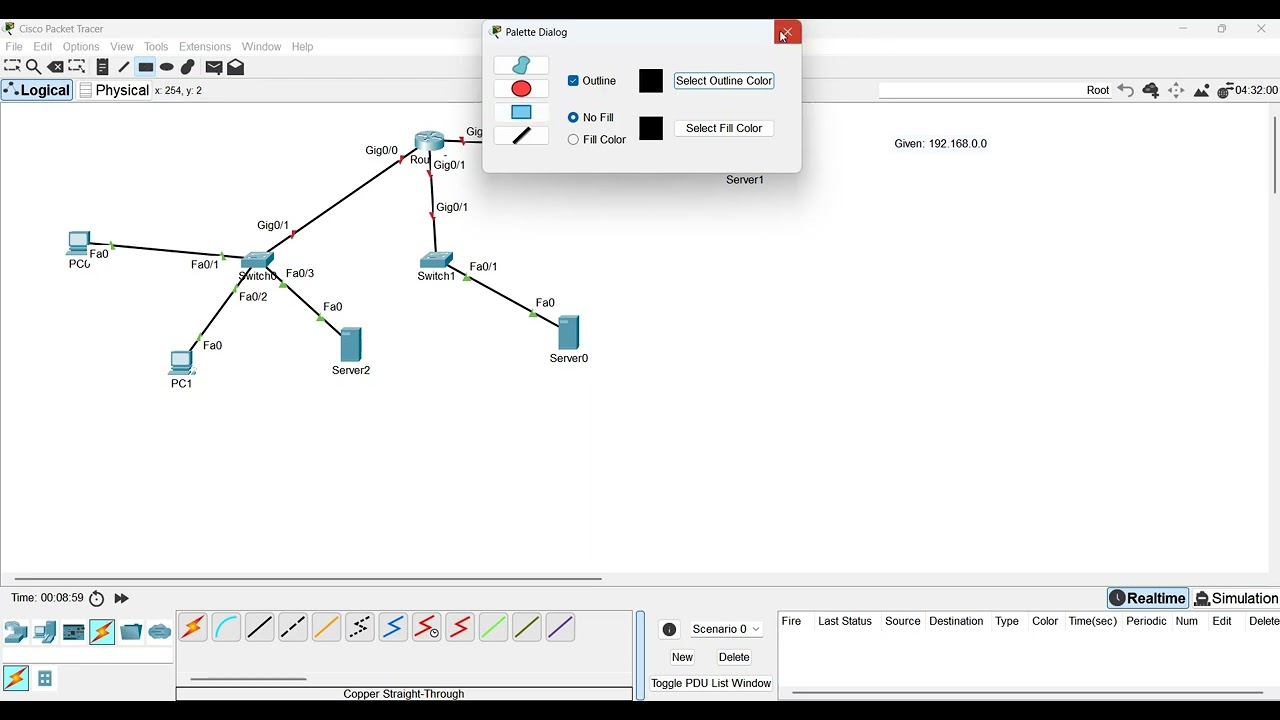
This video provides a step-by-step tutorial on configuring a network topology in Cisco Packet Tracer. It covers creating a network with three distinct subnets (Network A, B, and C), calculating and assigning IPv4 addresses, setting up servers for DHCP, DNS, and HTTP services, and configuring router interfaces. The tutorial emphasizes that while the topology remains the same, learners must perform their own IP address calculations based on given network requirements and host counts. Finally, it demonstrates how to test connectivity and verify the functionality of DHCP, DNS, and HTTP services.
How was this?
Save this permanently with flashcards, quizzes, and AI chat
Chapters
- The project involves creating a network with three distinct subnets: Network A, Network B, and Network C.
- Learners will use Cisco Packet Tracer to build the network, including routers, switches, and end devices (PCs, servers).
- Specific servers will be configured for DHCP, DNS, and HTTP services.
- Interconnections between devices will be made using appropriate cables (e.g., copper straight-through for end devices to switches, copper crossover or Gigabit Ethernet for switches to routers).
Understanding how to build a basic network topology is the foundational step for implementing and troubleshooting network services.
Placing a 2911 router, three switches, two PCs, and three servers (DHCP, DNS, HTTP) to form the initial network structure.
- The core task involves calculating IPv4 addresses based on a given base address (e.g., 192.168.0.0) and the required number of usable hosts per network.
- The formula '32 - prefix = number of host bits' and '2^host_bits - 2 = usable hosts' is used to determine the appropriate subnet prefix for each network.
- For Network A (e.g., needing 254 hosts), a /24 prefix is suitable (32-24=8 host bits, 2^8-2=254 usable hosts).
- For Network B (e.g., needing 126 hosts), a /25 prefix is suitable (32-25=7 host bits, 2^7-2=126 usable hosts).
- For Network C (e.g., needing 64 hosts), a /26 prefix is suitable (32-26=6 host bits, 2^6-2=62 usable hosts - adjusted to fit the example's calculation).
Accurate IP address calculation and subnetting are crucial for efficient network design, ensuring all devices have unique addresses and sufficient IP space without waste.
Calculating the subnet mask for Network A with a /24 prefix results in 255.255.255.0, and determining the network address (192.168.0.0), first usable address (192.168.0.1), last usable address (192.168.0.254), and broadcast address (192.168.0.255).
- Assign specific IP addresses to router interfaces, typically using the first usable IP address in each subnet.
- Configure end devices (PCs) with static IP addresses or obtain them dynamically via DHCP.
- Servers (DHCP, DNS, HTTP) are assigned static IP addresses, often the second usable address in their respective subnets.
- Default gateway addresses for end devices are set to the IP address of the router interface in their subnet.
Correctly assigning IP addresses and configuring default gateways ensures devices can communicate within their local network and reach external networks through the router.
Assigning 192.168.0.1 with a /24 subnet mask to the router's interface connected to Network A, and configuring PC0 with the third usable address (192.168.0.3) and 192.168.0.1 as its default gateway.
- The DHCP server is configured to automatically assign IP addresses, subnet masks, default gateways, and DNS server addresses to clients within a specified range.
- The DNS server is set up to resolve domain names (e.g., 'webserver.com') to their corresponding IP addresses.
- The HTTP server hosts web content (e.g., an 'index.html' file) that can be accessed via a web browser.
- Ensure the correct IP address and subnet mask are assigned to each server, and that they are reachable by other devices.
These server services are essential for network functionality, enabling automatic IP configuration, name resolution, and web access.
Configuring the DNS server with a record mapping 'webserver' to the IP address of the HTTP server (e.g., 192.168.1.130).
- Configure the router's interfaces with the correct IP addresses and subnet masks for each connected network.
- Enable the interfaces using the 'no shutdown' command.
- Test network connectivity using the 'ping' command between various devices (e.g., PC to server, PC to PC).
- Verify HTTP and DNS functionality by accessing the web server using both its IP address and its domain name via a web browser on a client PC.
Router configuration enables inter-network communication, and thorough testing validates that all configured services and connections are working as intended.
Pinging from PC0 to the HTTP server (192.168.1.130) and then accessing 'webserver' via the browser on PC1 to confirm DNS resolution and HTTP service.
Key takeaways
- Network design requires careful planning of IP addressing and subnetting to optimize address usage and network performance.
- Cisco Packet Tracer is a valuable tool for simulating and practicing network configurations.
- DHCP automates IP address assignment, simplifying client configuration and reducing errors.
- DNS is critical for translating human-readable domain names into machine-readable IP addresses.
- HTTP services allow for the hosting and retrieval of web content.
- Router interfaces must be correctly configured with IP addresses and enabled to facilitate communication between different networks.
- End-to-end connectivity testing using tools like ping and web browser access is essential to validate network functionality.
Key terms
Network TopologyPacket TracerIPv4 AddressingSubnettingPrefix Notation (/24, /25, /26)Subnet MaskNetwork AddressBroadcast AddressUsable Host AddressDHCP (Dynamic Host Configuration Protocol)DNS (Domain Name System)HTTP (Hypertext Transfer Protocol)Router InterfaceDefault GatewayStatic IP ConfigurationDynamic IP Configuration
Test your understanding
- What is the purpose of subnetting, and how does the prefix length determine the number of usable IP addresses in a network?
- How does DHCP simplify network administration, and what essential information does it provide to client devices?
- Explain the role of a DNS server in a network and how it facilitates access to web resources using domain names.
- What steps are involved in configuring a router interface, and why is the 'no shutdown' command necessary?
- How would you verify that both IP connectivity and the HTTP service are functioning correctly between a client PC and a web server?