18:06
Types of Operating Systems(Batch, Multiprogramming, Time Sharing, Multiprocessing, Real Time)
Jenny's Lectures CS IT
Overview
This video explains five fundamental types of operating systems: Batch, Multiprogramming, Multitasking (Time Sharing), Multiprocessing, and Real-Time. It details how each type evolved to improve CPU utilization and user interaction, moving from non-interactive batch processing to parallel execution in multiprocessing and strict timing in real-time systems. The explanations focus on the core mechanisms, advantages, and limitations of each OS type, providing a foundational understanding of their historical development and practical applications.
How was this?
Save this permanently with flashcards, quizzes, and AI chat
Chapters
- Jobs (program + input data + control instructions) were prepared on punch cards.
- Users could not interact directly with the system; an operator managed job submission and batching.
- Jobs with similar characteristics were grouped into batches to improve efficiency.
- CPU utilization was low because of the time taken for manual loading/unloading of punch cards and operator intervention.
Batch systems were an early attempt to automate job processing, laying the groundwork for more efficient operating systems by grouping similar tasks, though they lacked user interactivity and suffered from poor CPU usage.
Grouping Fortran programs together in one batch and COBOL programs in another, then processing each batch sequentially.
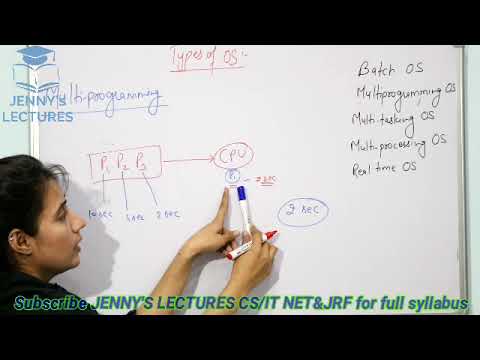
- Multiple programs reside in main memory simultaneously.
- When one program performs an I/O operation, the CPU is allocated to another ready program.
- This significantly increases CPU utilization compared to batch systems.
- A running program could not be forcefully removed from the CPU; it had to yield voluntarily (e.g., for I/O).
Multiprogramming was a crucial step towards efficient CPU usage by allowing the processor to work on other tasks while one was waiting for I/O, but it still had limitations regarding process preemption.
While Process P1 is waiting for data from a disk, the CPU switches to execute Process P2.
- An extension of multiprogramming that allows for preemption of CPU.
- Each process is allocated a small time slice (time quantum).
- The CPU rapidly switches between processes, creating the illusion of simultaneous execution.
- This provides a more interactive user experience and fairer resource allocation.
Multitasking, also known as time-sharing, enables interactive computing by giving each user or process a slice of CPU time, making the system feel responsive even with many active tasks.
A 2-second time quantum allows Process P1 to run, then P2, then P3, before cycling back to P1, even if P1 needs 10 seconds to complete.
- Utilizes multiple CPUs within a single computer system.
- Allows multiple processes to execute truly in parallel, not just concurrently.
- Increases overall system throughput and reliability.
- Distinct from a multi-computer system, which involves multiple independent computers connected.
Multiprocessing leverages multiple processors to achieve true parallel execution, significantly boosting performance for demanding applications and enhancing system resilience.
A quad-core processor allows four different tasks to run simultaneously on separate cores.
- Designed for applications with strict time constraints.
- Soft real-time systems aim to complete tasks within deadlines, tolerating occasional misses.
- Hard real-time systems require tasks to be completed at the exact specified time, with no tolerance for misses.
- Used in critical applications like missile launching, medical equipment, and industrial control.
RTOS are essential for systems where timing is critical, ensuring that operations occur within precise deadlines to maintain system stability, safety, and functionality.
A system controlling a patient's life support machine must respond instantly and precisely to physiological changes.
Key takeaways
- Operating systems evolved from non-interactive batch processing to interactive multitasking and parallel processing to meet increasing demands for efficiency and responsiveness.
- CPU utilization is a key metric improved by each successive generation of operating system types.
- Multiprogramming and multitasking achieve concurrency by switching between processes, while multiprocessing achieves true parallelism using multiple CPUs.
- Time-sharing (multitasking) creates the illusion of simultaneous execution through rapid context switching based on time quanta.
- Real-time operating systems prioritize meeting strict timing deadlines, with hard real-time systems being critical for safety and reliability.
- Understanding the differences between these OS types is crucial for selecting the appropriate system for specific computational needs.
Key terms
Batch Operating SystemJobPunch CardOperatorMultiprogrammingCPU UtilizationMultitaskingTime SharingTime QuantumContext SwitchingMultiprocessingReal-Time Operating System (RTOS)Soft Real-TimeHard Real-Time
Test your understanding
- What was the primary limitation of batch operating systems that led to the development of multiprogramming?
- How does multiprogramming improve CPU utilization compared to batch processing?
- Explain the difference between multiprogramming and multitasking in terms of process preemption.
- What is the fundamental difference between multiprocessing and multitasking?
- Why are real-time operating systems critical for applications like medical devices or aerospace control?