24:31
New Credit Management Part 1: Auto credit limit calculations - Nextone Consulting
Nextone Consulting
Overview
This video introduces a new automated credit limit calculation feature in Dynamics 365 for Finance. It explains how to enable the feature, configure risk classifications and scoring groups based on customer data like account status and growth index, and assign points. The system then uses these points to categorize customers into risk groups (low, medium, high). Finally, it demonstrates how to set up automatic credit limits based on these risk groups and specific scoring group values, and how to generate and post these credit limit adjustments through a journal. The importance of sequencing in the automatic credit limit setup is also highlighted.
How was this?
Save this permanently with flashcards, quizzes, and AI chat
Chapters
- The new automated credit limit calculation feature is available in Dynamics 365 Finance starting from the 2020 release wave 1.
- To use the feature, it must first be enabled via the 'Feature management' workspace.
- Key settings are found in 'Credit and collections parameters', specifically under the 'Credit' tab, where manual editing of credit limits should be disabled to enforce the automated process.
- Disabling manual editing requires users to adjust credit limits through a dedicated 'Credit limit adjustments' form.
Enabling and configuring the initial parameters ensures the system is ready to process and calculate credit limits automatically, preventing manual overrides and standardizing the process.
Navigating to Feature Management, searching for 'credit', and enabling the 'Credit management' feature.
- Risk classifications (e.g., Low, Medium, High) are defined as point ranges (e.g., 0-35 for Low, 36-60 for Medium, 61-100 for High).
- Scoring groups determine how points are assigned to customers.
- The 'Account' scoring group uses customer attributes like 'Account status' (e.g., Small, Medium, Large, Blocked), with each status assigned a point value.
- The 'Growth' scoring group uses a user-defined 'Growth index' which maps to different point values based on a growth rate.
These classifications and scoring groups form the foundation for evaluating customer creditworthiness, allowing for a data-driven approach to risk assessment.
Defining a 'Low' risk classification for 0-35 points, and a 'Growth' scoring group where a growth index of 71-100 yields 50 points.
- Customer scores are updated by assigning values to the defined scoring groups.
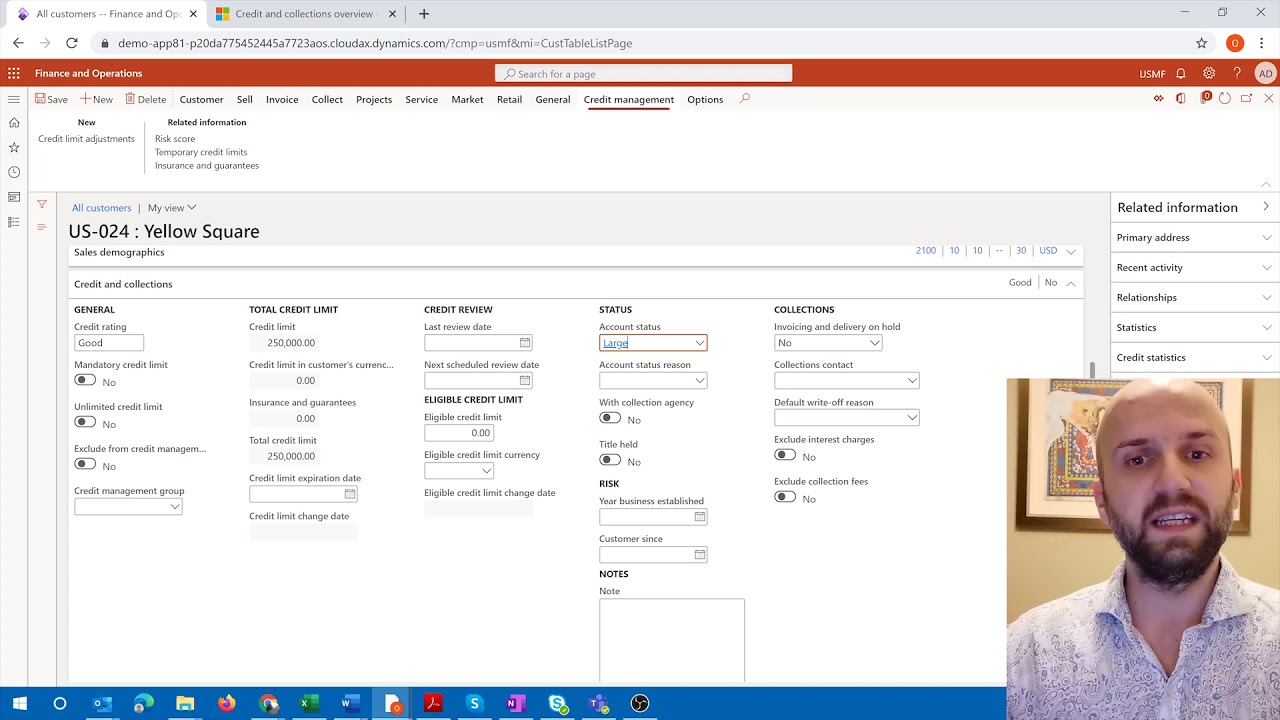
- Account status can be set directly on the customer master record.
- User-defined scoring groups, like the 'Growth index', may require manual input on a dedicated 'Risk score' tab for each customer.
- A periodic job, 'Update risk scores', must be run to process changes made to customer master data and reflect them in the risk score calculations.
Accurately assigning scores to individual customers is crucial for the system to correctly categorize them and subsequently calculate appropriate credit limits.
Setting a customer's 'Account status' to 'Large' and then running the 'Update risk scores' job to see the 50 points reflected in their risk score.
- Automatic credit limits are defined based on the customer's risk group (Low, Medium, High) and specific scoring group values.
- For each risk group, multiple rules can be set up, considering different scoring groups (e.g., Account status, Growth index) and their values.
- The system evaluates these rules sequentially, and the first matching rule determines the suggested credit limit.
- The order (sequencing) of these rules is critical, as it dictates which credit limit is applied if a customer meets criteria for multiple rules.
This step translates the calculated risk scores into actionable credit limits, directly impacting sales and customer transactions.
Setting up a rule for the 'Low' risk group where a 'Medium' account status results in a 20,000 credit limit.
- Credit limit adjustments are managed through a journal posting process.
- A new journal header is created, and the 'Generate' function is used to calculate automatic credit limits for selected customers.
- Filters can be applied to select specific customers, such as those with unlimited credit limits set to 'no'.
- After generating the suggested credit limits, they are reviewed and then 'Posted' to activate them for the customers.
This final step activates the newly calculated credit limits, ensuring that the system enforces the defined credit policies for all customers.
Generating credit limit suggestions for customer 21, seeing a suggested limit of 20,000 based on their 'Low' risk group and 'Medium' account status, and then posting the journal to apply it.
Key takeaways
- Automated credit limit calculation in Dynamics 365 Finance standardizes credit management by using configurable rules and customer data.
- Customer risk is assessed through a combination of defined risk classifications and scoring groups that leverage various customer attributes.
- The 'Update risk scores' periodic job is essential for reflecting changes in customer master data into their calculated risk scores.
- The configuration of automatic credit limits requires careful attention to sequencing, as the order of rules determines which limit is applied.
- Credit limit adjustments must be processed through a journal, preventing direct manual edits on customer records.
- The system can consider multiple scoring factors (like account status and growth) simultaneously or individually when determining credit limits.
Key terms
Automated Credit Limit CalculationFeature ManagementCredit and Collections ParametersRisk ClassificationScoring GroupsAccount StatusGrowth IndexUpdate Risk Scores JobAutomatic Credit LimitsCredit Limit Adjustments Journal
Test your understanding
- How does the system use risk classifications and scoring groups to determine a customer's creditworthiness?
- What is the purpose of the 'Update risk scores' periodic job in the automated credit limit process?
- Why is the sequencing of rules critical when configuring automatic credit limits?
- What steps are involved in generating and activating new credit limits for customers using the system?
- How does disabling manual credit limit editing on the customer form impact the credit limit adjustment process?