11:04
This API Workflow Just Makes More Sense
Lama Dev
Overview
This video advocates for a local-first approach to API development workflows, contrasting it with cloud-first models. It highlights the benefits of keeping API data and configurations as plain files within a project's codebase, managed by Git. The presenter introduces Requestly as a tool that facilitates this local-first workflow, emphasizing its features for local storage, version control integration, dynamic request/response manipulation with JavaScript, robust testing capabilities, and seamless integration with AI development tools. The core message is that a local-first, Git-managed API client improves control, security, and developer efficiency.
How was this?
Save this permanently with flashcards, quizzes, and AI chat
Chapters
- Modern development tools are increasingly cloud-first, but local-first options should remain available.
- Cloud-first workflows can increase security and compliance burdens by expanding the management surface.
- Local-first workflows keep sensitive API data closer to the codebase, offering greater control.
- This model is particularly beneficial for larger or security-sensitive development environments.
Understanding the trade-offs between cloud-first and local-first approaches helps developers choose the most secure and efficient workflow for their specific project needs and team constraints.
Teams in security-sensitive environments often prefer local-first workflows where data stays closer to the codebase, unlike cloud-centric platforms.
- Requestly is a lightweight, local-first API client that doesn't require login or extensive system resources.
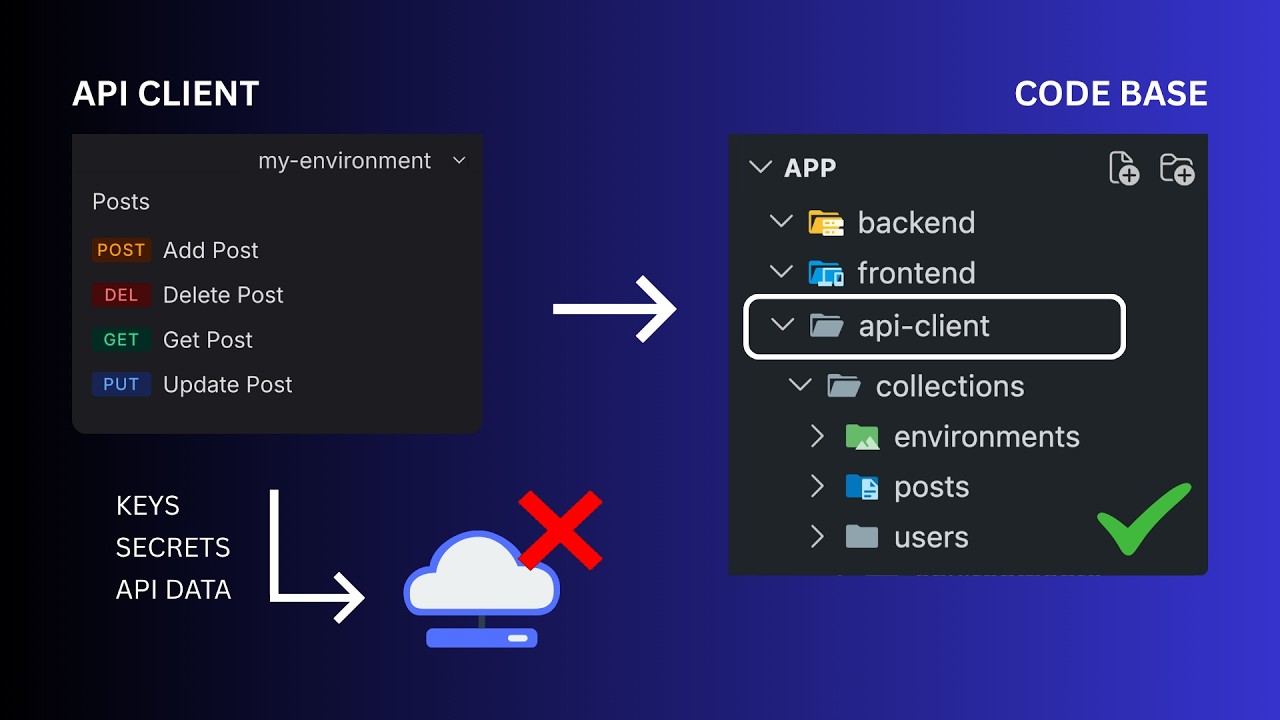
- API project data (collections, environments, secrets, test data) is stored as plain files on the local machine.
- This local data can be version-controlled using Git, integrating directly into the project's codebase.
- API collections become part of the codebase rather than being locked in a vendor's cloud workspace.
Treating API client configurations as code, managed by Git, makes them versionable, shareable, and directly integrated with your application's development lifecycle.
A task management app's API endpoints and configurations are saved as plain files in a project folder, which can then be pushed to a GitHub repository alongside the backend and frontend code.
- Local API project files can be stored in Git repositories for individual projects or team sharing.
- Git becomes the source of truth for API configurations, offering control over changes and history.
- Multiple local workspaces can be managed simultaneously, ideal for microservices architectures.
- Permissions are managed through standard Git access controls, simplifying collaboration in complex environments.
Leveraging Git for API configurations streamlines collaboration, especially in microservices, by using familiar version control and access management systems.
In a microservices setup, each service's API configuration can live in its own Git repository, with access controlled by Git permissions, eliminating confusion about who can access specific collections.
- Requestly allows dynamic customization of API requests and responses using JavaScript.
- Pre-request scripts can manipulate requests before they are sent, useful for generating dynamic data or handling authentication.
- Post-response scripts can process responses, extract data like tokens, and update environment variables automatically.
- This capability is crucial for testing and ensuring compatibility between API changes and frontend consumption.
The ability to script request and response modifications enables sophisticated testing, automated data generation, and seamless handling of dynamic data like authentication tokens.
A pre-request script can generate a unique username and email using timestamps for authentication tests, storing them as environment variables, while a post-response script can extract an authentication token and save it for subsequent requests.
- Requestly supports writing custom tests using JavaScript within the API client.
- Tests can validate response structure, field names, data types, and performance metrics (e.g., response time).
- These scripts run directly within the workspace, allowing immediate feedback on API correctness.
- NPM packages can be used within these JavaScript scripts for extended functionality.
Implementing comprehensive, scriptable tests directly within the API client ensures that API changes are correct, performant, and meet data integrity requirements before impacting consumers.
Tests can be written to verify that a 'get task' endpoint returns expected field names ('id', 'name', 'completed'), that the 'task_id' is a number, and that the request completes in under one second.
- Local-first API configurations stored as plain files are easily accessible to AI development tools.
- Project context files (like .md) can provide instructions and structure for AI assistants.
- AI tools can generate or update API requests based on project context and instructions.
- AI can help identify issues like hardcoded secrets by analyzing the project's API configurations.
Integrating AI tools with a local-first, Git-managed API workflow allows for more efficient development, automated testing, and faster debugging by leveraging AI's analytical capabilities on your codebase.
An AI assistant can be instructed to check for hardcoded credentials within API configurations and help identify the source of a failing request caused by a forgotten hardcoded token.
Key takeaways
- A local-first API client, like Requestly, keeps your API configurations as plain files within your project, enhancing control and security.
- Integrating API client configurations into your codebase via Git makes them versionable, shareable, and part of your development lifecycle.
- Requestly's scripting capabilities (pre- and post-response) allow for dynamic data generation, automated authentication handling, and sophisticated response processing.
- Robust, scriptable testing within the API client is essential for validating API correctness, performance, and data integrity.
- Local-first API workflows seamlessly integrate with AI development tools, enabling AI-assisted code generation, debugging, and analysis.
- Requestly offers a free tier with collaboration features, making advanced local-first workflows accessible.
- Choosing a local-first approach can reduce the security and compliance surface area compared to cloud-first solutions.
Key terms
Local-first workflowCloud-first workflowAPI clientRequestlyVersion controlGit repositoryEnvironment variablesPre-request scriptPost-response scriptAPI testingAI development toolsMicroservices architecture
Test your understanding
- What are the primary security and control benefits of a local-first API workflow compared to a cloud-first one?
- How does Requestly enable API configurations to become part of a project's codebase?
- Explain how pre-request and post-response scripts in Requestly can automate tasks like authentication and data handling.
- What types of API tests can be implemented using Requestly's scripting capabilities?
- How can local API configurations facilitate better integration with AI development tools?