License to Kill: Malware Hunting with the Sysinternals Tools
Mark Russinovich
Overview
This video introduces the Sysinternals suite of tools for detecting, analyzing, and removing malware from computer systems. Mark Russinovich explains that traditional antivirus software often has a lag time in detecting new threats, necessitating manual investigation. The presentation covers a step-by-step process for malware cleanup, emphasizing reconnaissance with tools like Process Explorer and Autoruns, identifying suspicious processes, and removing persistence mechanisms. It delves into real-world examples of malware, including scareware, ransomware, Bitcoin miners, and sophisticated cyber warfare tools like Stuxnet and Flame, demonstrating how Sysinternals tools can be used to uncover their activities and neutralize them.
Save this permanently with flashcards, quizzes, and AI chat
Chapters
- Many modern malware threats are not detected by traditional antivirus software due to signature update delays.
- A significant percentage of malware remains undetected even by major antivirus engines.
- Sysinternals tools provide advanced capabilities for analyzing and cleaning malware when antivirus fails.
- The goal is to identify malware, understand its behavior, and remove it from infected systems.
- Disconnect the infected system from the network to prevent reinfection or data exfiltration.
- Conduct reconnaissance to identify suspicious processes and their activities.
- Terminate identified malicious processes to halt their operation.
- Locate and remove malware's auto-start mechanisms to prevent re-infection upon reboot.
- Delete the malware files as a final precaution and repeat the process if necessary.
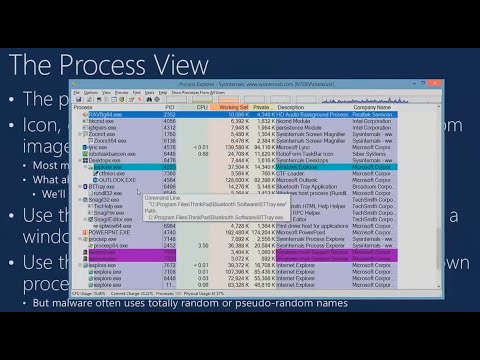
- Process Explorer, a 'super Task Manager,' offers more detailed process information than the built-in Windows Task Manager.
- Key indicators of suspicious processes include missing icons, no company name or description, invalid digital signatures, unusual installation locations (e.g., Windows directory), packed executables, and suspicious strings or network connections.
- The tool displays parent-child process relationships, helping to identify compromised parent processes.
- Color-coding (e.g., purple for packed/encrypted processes) and tooltips provide quick visual cues.
- The 'Window Finder' tool helps identify which process is responsible for a specific window or pop-up.
- Digital signatures verify the authenticity and integrity of software; unsigned or invalidly signed executables are often suspicious.
- Process Explorer can verify image signatures, and a 'Verified Signer' column can be added for quick identification of unsigned processes.
- Autoruns is a crucial tool for discovering all the ways programs are configured to launch automatically on system startup or login.
- Autoruns helps identify malware persistence mechanisms hidden in registry run keys, services, scheduled tasks, and other auto-start locations.
- Filtering out Microsoft-signed entries and hiding verified signatures in Autoruns helps focus on potentially malicious non-Microsoft entries.
- Process Monitor (Procmon) captures detailed file system, registry, network, and process/thread activity.
- The slogan 'When in doubt, run Process Monitor' emphasizes its utility for deep system analysis.
- Filtering is essential in Procmon to isolate relevant events and reduce noise.
- The 'Strings' utility (and Procmon's memory strings view) can reveal embedded text within processes, potentially exposing URLs, commands, or other clues.
- Procmon's 'Category is Right' filter is useful for observing system modifications, often indicative of malware actions.
- Winwebsec is a prevalent scareware example that aggressively tries to trick users into purchasing fake protection.
- Lockscreen ransomware completely takes over the system, demanding payment to unlock it, and often hides from standard analysis methods.
- Bitcoin miners, like ViseNoir, use a system's CPU or GPU resources without consent to generate cryptocurrency for the attacker.
- A case involving an Exchange server making outbound FTP connections revealed a compromised SQL server instance being exploited for malware delivery.
- Sophisticated threats like Stuxnet and Flame represent advanced cyber warfare and espionage tools, utilizing zero-day vulnerabilities and complex rootkits.
- Booting into Safe Mode with Command Prompt is often necessary to clean malware that interferes with standard analysis tools.
- Malware can employ 'buddy systems' where processes monitor and restart each other, requiring suspension rather than termination.
- Some malware, like certain versions of Winwebsec, uses the 'RunOnce' registry key, which executes only once per shutdown/startup cycle, making it stealthy.
- Process Monitor's boot logging capability is vital for capturing malware activity during system startup and shutdown.
- Highly sophisticated malware like Flame may actively avoid detection if tools like Process Explorer are detected running.
Key takeaways
- Antivirus software is not foolproof; advanced tools are necessary for comprehensive malware detection and removal.
- A systematic approach involving network isolation, process analysis, and persistence removal is key to effective malware cleanup.
- Process Explorer and Autoruns are indispensable Sysinternals tools for identifying suspicious processes and their auto-start mechanisms.
- Process Monitor provides deep system visibility, crucial for tracing malware behavior and understanding its infection vectors.
- Malware authors constantly evolve their techniques, using obfuscation, rootkits, and zero-day exploits to evade detection.
- Understanding digital signatures is a vital step in differentiating legitimate software from malicious imposters.
- Even seemingly simple malware can employ complex persistence methods, requiring advanced analysis techniques like boot logging.
Key terms
Test your understanding
- Why is it important to disconnect a system from the network before beginning malware analysis?
- What are at least three characteristics that Process Explorer can help identify as potentially malicious processes?
- How does Autoruns assist in removing malware from a system, and why is it preferred over msconfig for this task?
- Describe a scenario where Process Monitor's boot logging feature would be essential for malware analysis.
- What is the significance of digital signatures in identifying malware, and how can tools like Process Explorer help verify them?